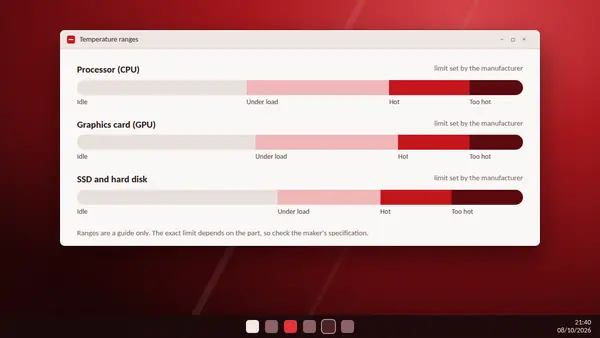
HW Monitor gives you the numbers. It does not tell you whether they are good. This guide gives typical ranges so that you can judge your own readings. Treat them as a guide. Every part has its own limit, set by the manufacturer.
Processor (CPU)
- Idle: roughly 30 to 50 °C on a desktop. Laptops and small PCs often idle a little higher.
- Everyday use: 40 to 65 °C.
- Heavy load: 70 to 85 °C is common in games, rendering and benchmarks.
- Near the limit: many processors start to slow themselves down between about 95 and 105 °C.
Some recent high-end desktop processors are designed to run close to their limit under full load. That is expected behaviour for those models, so always compare with the maker's specification before deciding there is a fault.
Graphics card (GPU)
- Idle: 30 to 50 °C. Many cards stop their fans completely at idle, so 0 RPM is normal.
- Gaming: 60 to 80 °C is typical.
- Hot spot: HW Monitor also reports a hot spot temperature on many cards. It is the hottest point on the chip and normally reads 10 to 20 °C above the main GPU figure.
SSD and hard disk
- Hard disks: happiest between about 25 and 45 °C.
- SSDs: 30 to 60 °C in normal use. Fast NVMe drives can run warmer during large file copies.
Mainboard and memory
Mainboard sensors usually read 30 to 50 °C. Memory modules with their own thermal sensors appear in HW Monitor too and normally stay well below 60 °C.
What changes the numbers
- Room temperature: a hot room raises every reading by a similar amount.
- Case airflow: blocked vents and too few fans trap warm air.
- Dust: a clogged cooler is the most common cause of rising temperatures over the years.
- Laptop or desktop: thin laptops run hotter by design.
When to act
- Idle temperatures far above the ranges here.
- Max readings that sit at the limit for long periods.
- Sudden slowdowns, stuttering or shutdowns under load.
- A fan that reads 0 RPM while the part it cools is hot.
What to do
- Clean dust from fans, heatsinks and filters.
- Make sure every fan spins, using the Fans section in HW Monitor.
- Give the PC space. Keep vents clear and laptops on a hard surface.
- Replace old thermal paste on a processor that is several years old.
- Measure again and compare the Max column with your earlier result.